| Home | Job | Pinball | Photo Album | Automotive | Press/Awards | Contact |


Panasonic KX-HCM10 Web Cam
Introduction
I have long wanted a
robust way of streaming video over the Internet
from
my home. I could use this communication method to keep in
touch
with
the family when I am at the office, or when I am away on
travel.
We could also use it to make sure everything is ok at home during our
long
absences when I am supporting a shuttle
mission
in Florida or Texas. For a while, I used a Connectix QuickCam
VC, with iVista
software.
However, I soon realized there were two problems. First, I
lacked
the ability to look around the room (important when a child has knocked
the camera out of alignment), and second, the web server software
really
bogged down my home automation PC.
To address the first problem, I had considered building a pan-tilt unit using a few RC servos connected to a PIC Web Server, but this seemed like it would result in a unappealing looking kludge. For the second one, I had previously seen the cameras from Axis, that have a integral web server. This eliminated the loading on the PC, but they typically cost over $1000. In addition, they are quite heavy, and a small RC servo would not be able to pivot them around.
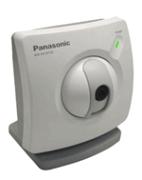
The Panasonic Web Cam with an integral pan-tilt unit.
Click for a larger view.
A solution is found
Then in the fall of
2001, I found a new product from Panasonic during a
web search. It is a bona fide web cam. Thus a video
camera
married to an integral web server, which allows access to the streaming
video from any web browser. It also had a very unusual
feature:
an
integral pan-tilt assembly! Best of all, it was within my
price
range
: $500.
There is more to this little camera than the pan-tilt unit however. In addition to the built-in web server, the unit also feature e-mail and ftp functionality. When triggered by a time or digital input, it can e-mail or ftp an image to a location/address of your choosing. One could set up one of these units in a security monitoring situation. It also has a digital output so that you can use the remote web interface to turn on a light or other device. For multiple site monitoring, the camera has built-in support so that up to four live streaming cameras can be viewed from one web page.

The integral web server features multiple screens, and this is the
main view/control screen.
Note the graphic in the top left that allows the user to pan and tilt
around the room. The
above image was taken at night using a low light level.
Installation and use
It took me one evening
to run one more 10BaseT connection
to the mounting location in a neat unobtrusive manner, and setup of the
camera was very easy, although I do believe that some network expertise
is needed. The motorized functions allow me to 'cover' most
of
the
first floor of my home with the camera. The images are very
clear
and the camera performs exactly as described by the Panasonic
descriptions.
Overall, I am extremely pleased with it.

The web cam mounted at the top of my kitchen cabinet, which provides
for an opportunity to
hide the wires. The tripod mount at the bottom of the camera
is used with a small camera
swivel that I had on hand. This swivel allows precise
positioning
to maximize the use
of the pan-tilt range.


Two example images. Left: kitchen. Right:
Dinette/Family
Room. The home has an 'open' design, allowing
one camera to see almost the whole first floor. The
brightness
level can be varied from the
web interface if a particular detail needs to be more closely
inspected.

By changing the resolution and magnification factor, one can zoom into
a particular
area. This scene shot just after breakfast.
Thanks to the DSL connection to my home, and my registration of a domain name, I can now go to any web browser, type in a URL and password, and see live streaming video from my home. Using the pan-tilt feature, I can look around the house, and no PC is involved.
Using web searches, I
saw prices from a high of $500 (list) to a low
of $400. The camera was purchased in October 2001 from
www.securityideas.com
(link below) for $399. Use the links below for more
information
and
a live demo of the camera in action.
Tips/Tricks
Chris Womack sent me this note on connecting the camera to a motion sensorLong term update/Unit Log:
- 26 October 2001 - Installation.
- 7 July 2003 - Updated firmware to version 1.62 (link below). An nice added feature is preset camera locations so one can quickly pan and tilt to one of eight programmable position. I have been wishing for this for a long time. After registering with the free DNS service, I can now access the camera at any time from the web. I also had to repair the tilt function. A small gear on the tilt motor cracked, and it would not run properly. It was repaired by cleaning the gear and axis with acetone, and using epoxy to stick the gear onto the motor's axis.
- 9 July 2003 - Found out more information abou the free DNS service (link below). Every 15 to 20 minutes the camera sends information to the central server to verify its entry in the IP data base. This accomodates dynamic IP addresses such that I have. This provides a second method for me to find my home on the Internet using a Domain Name.
- 10 July 2003 - The above repair did not last, and I had to buy a new tilt motor (part number PSWQ1HCM10M) from the Panasonic web site for about $27. Fortunately, the new gear is made of metal, and should last much longer.


The old motor is shown on the right; note the split nylon gear.
The new gear is made of brass.
- 17 August 2003 - In addition to being just a web cam, the unit also has a single bit input and output. The output bit can be used to control a light or other device. In my system, I connected this control to the power ON/OFF switch of my Home Automation PC. This allows for the rare case when I am out of the home for a long time and I need to reboot the PC.
- 8 October 2003 - A second KX-HCM10 unit was purchased on ebay for $150. I can now see almost all of the common areas of the home, both upstairs as well as downstairs. The two cameras are 'linked' so that I can see both on one web page.
- 9 August 2011 - Pan motor is PSWQ2HCM10M1 (original has label with PM25S-048-QMH9). Tilt motor is PSWQ1HCM10M1 (original is marked PM25S-048-QMH8). I believe the '1' at the end is the version with the brass motor gear. Cost for each is now $41.69 from the Panasonic website.
Links:
- Official Panasonic Web Site
- www.securityideas.com
- iVista's web page on this camera
- viewnetcam.com's free DNS service for this camera